



Page Topics:
LAND REDEMPTION - Sold To State
• Land Redemption is the process by which the parcel that has been sold in tax sale is bought back or reclaimed by the owner.
• To reclaim the parcel redeemer/original owner must pay the taxes owed (tax & cost), interest, and fees along with the fulfilment of any other conditions.
• In tax sale, if a parcel is sold to an individual/investor, the redeemer can redeem the property before or up to three years from the date of tax sale.
• In tax sale, if no one buys the property, it will go to State (sold to state).
• If a parcel is sold to State, the redeemer can redeem the property at any time provided no transfer has happened on that parcel. If the investor buys a property from the State (i.e. transfer) then it is similar to the investor buying the property on the day of tax sale.
• Three years after the tax sale, the investor may demand a tax deed (a legal document that grants ownership of a property). Once the investor gets a tax deed, the owner will not be eligible to redeem the property through the County.
Land Redemption Processing
• Login as the LR user who is privileged to work on land redemption processing.
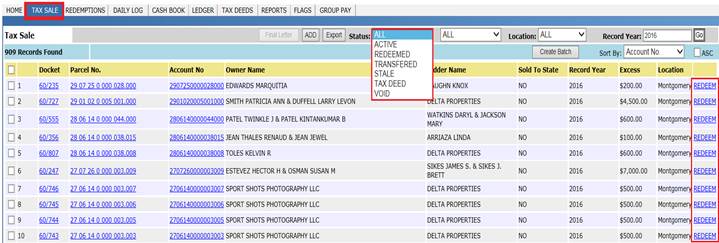
• By clicking on the TAX SALE tab, users can see all the parcels that are available to redeem by applying proper filters.
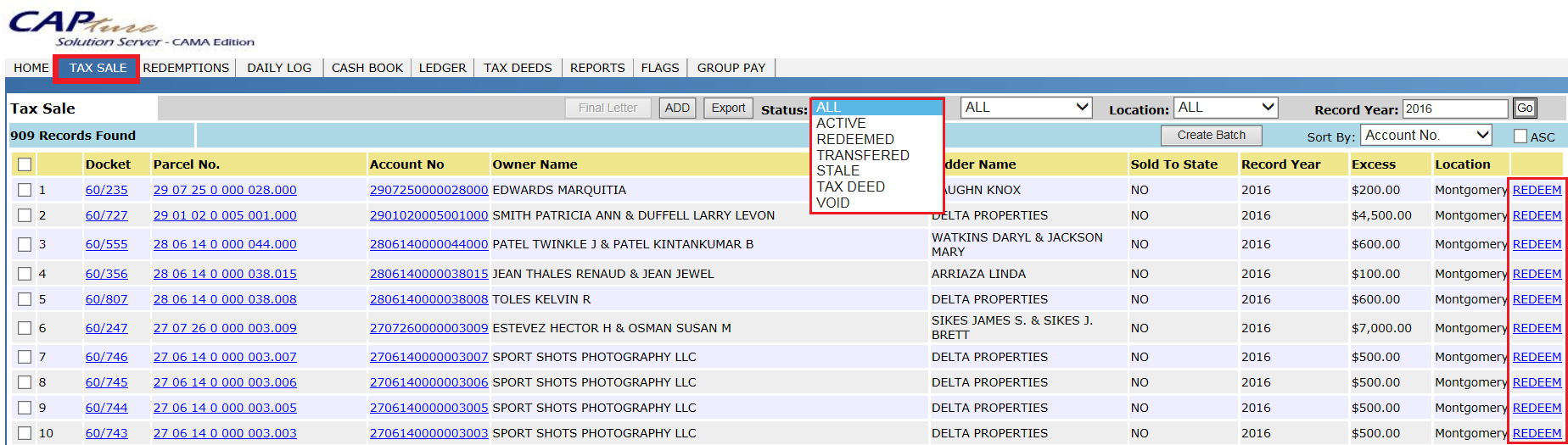
Redemption Of Property Sold To State
If a parcel is sold to state, redeemer can redeem the property at any time provided no transfer has happened in between on that parcel. Because, if investor bought a property from the state (i.e. transfer) it is like investor buying the property on the day of tax sale.
Case Setup: Parcel(04 07 26 1 000 009.000) is sold in 2016 tax sale to State on 06/07/2017 and Owner (WARE PAUL) came to redeem the property on 07/31/2017. Also, there is a deed (Instrument number: 04950-0543) for tax year 2018 with Name and Sales changes marked on it.
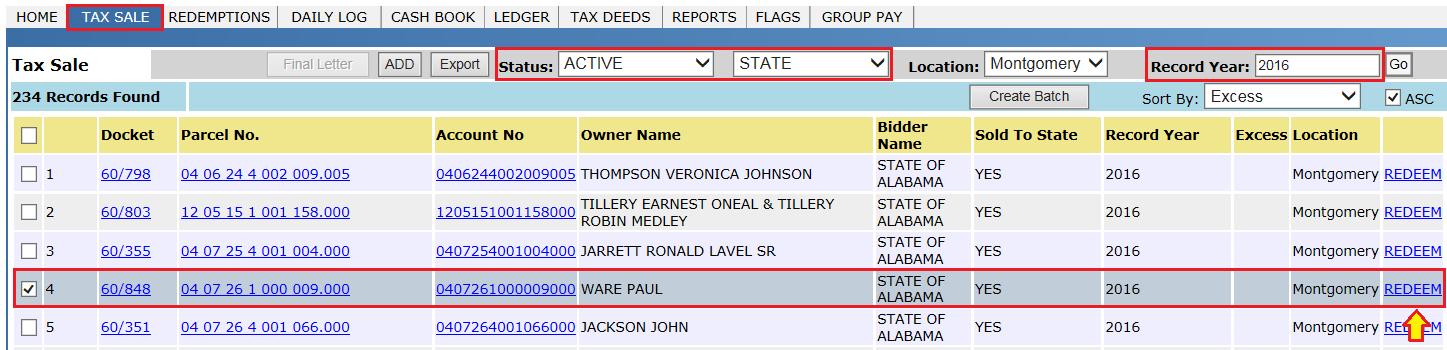
• From the Tax Sale page, click the REDEEM hyperlink which will redirect to the Redemption Dashboard.
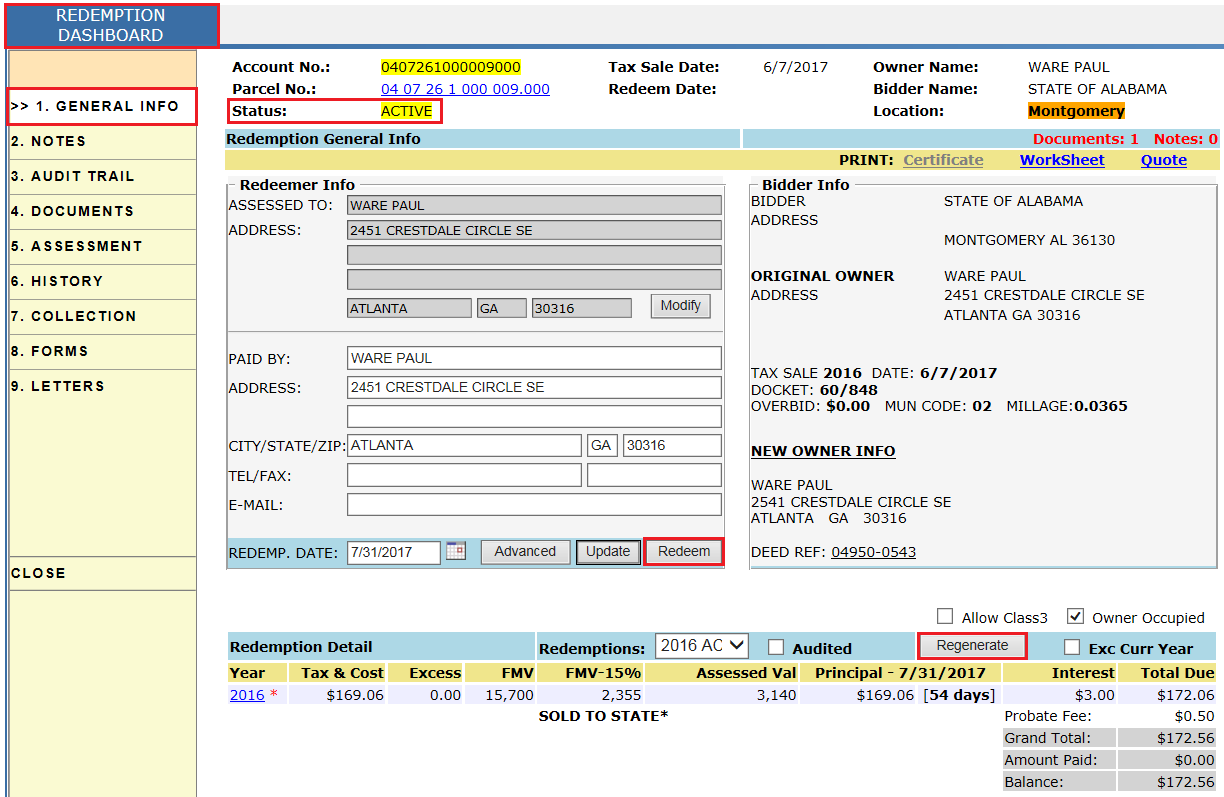
• Click on the Redeem button to redeem the property and the Collection Dashboard opens.
• From the Collection dashboard, users can pay the total due to redeem the property (for reference see Case 1 - Sold To Individual).
• After paying the total due, users will see status is changed to Redeemed and the Certificate of Land Redemption is generated.
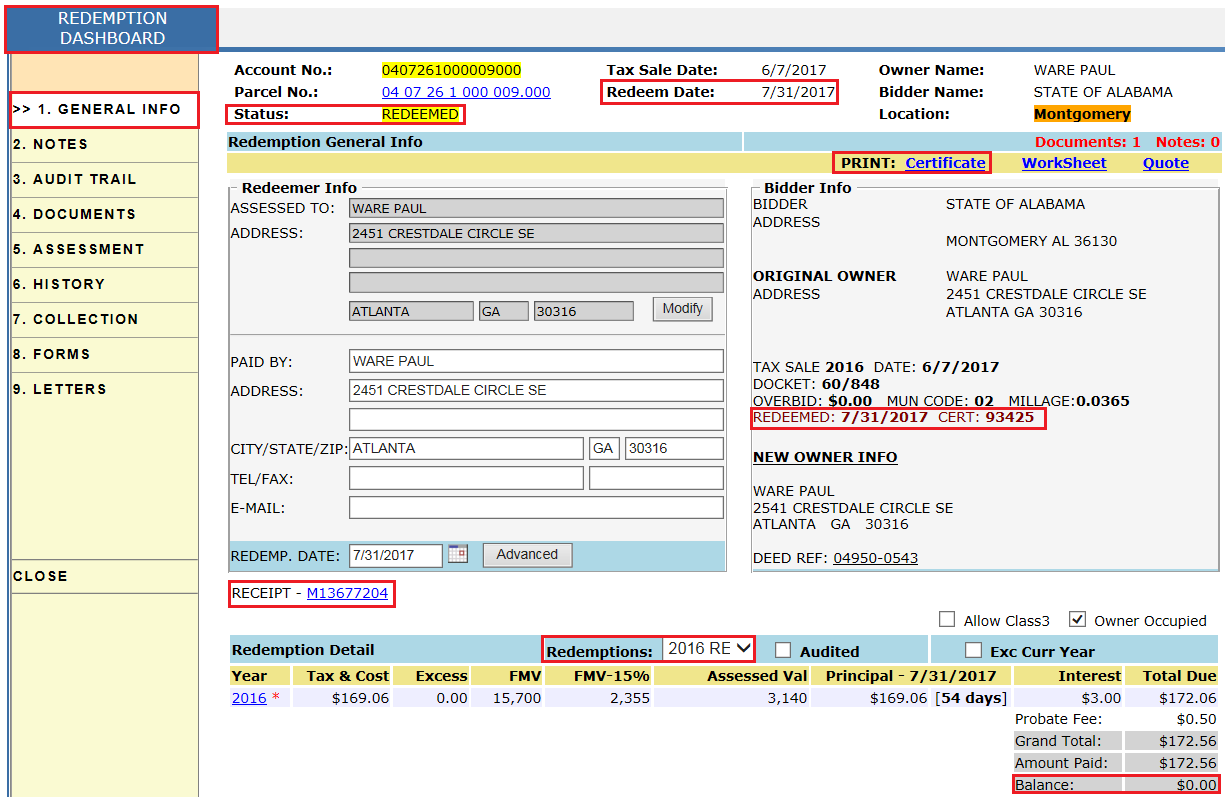
• Users can print the Certificate of Land Redemption by clicking the Certificate hyperlink (for reference see Case 1 - Sold To Individual).
Audit Trail of Redemption Dashboard: Once the parcel is redeemed, users can see the audit of who redeemed the property, total paid, and the assignment of the redemption certificate along with the certificate number.

History on the Redemption Dashboard: From this tab, users can see previous redemption records.
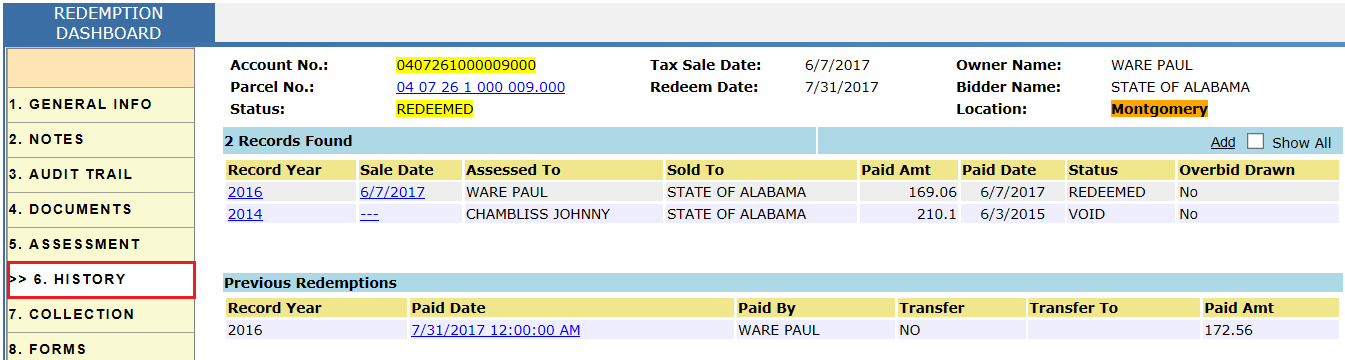
Flags generated for the parcel: After Redemption, flags will be generated and privileged users must process the flags. In this case, two flags were generated; one for 2017 to create a supplement receipt on the name of redeemer and the other for 2018 as there is a deed with name change.

Transfer Of Property To Individual/Investor
If a parcel is Sold to State, state can transfer/sell the property to individual/investor. Once it is transferred/sold to investor then it is like the investor bought the property on the day of tax sale.
Case Setup: Parcel is sold in 2016 tax sale to State on 06/07/2017. State is selling/transferring the property on 08/01/2017 to the individual/investor (JAMES EARL).
• From the Tax Sale page, click the Redeem hyperlink which will redirect to Redemption Dashboard.

• From the Redemption Dashboard, click the Advanced button to add the information of investor and what amount investor must pay.
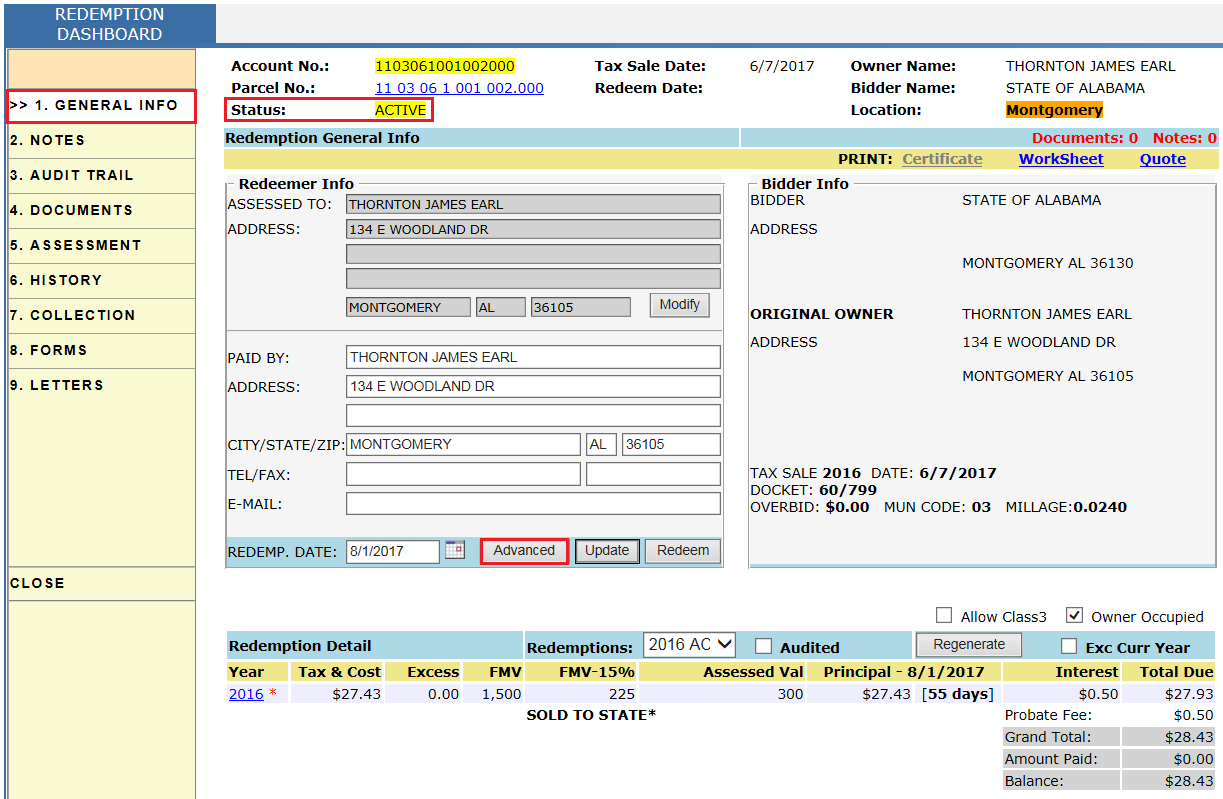
Note: Allow Class 3 & Owner Occupied checkboxes will be used for Total Due calculation to see 'what if' class 3 and or homestead are given (this functionality will work only if there is an active collection record on the redemption dashboard).
• Under Advanced Information, mark the Transferred checkbox, enter investor information, transfer amount, County portion, and fees (if any) then click Update.
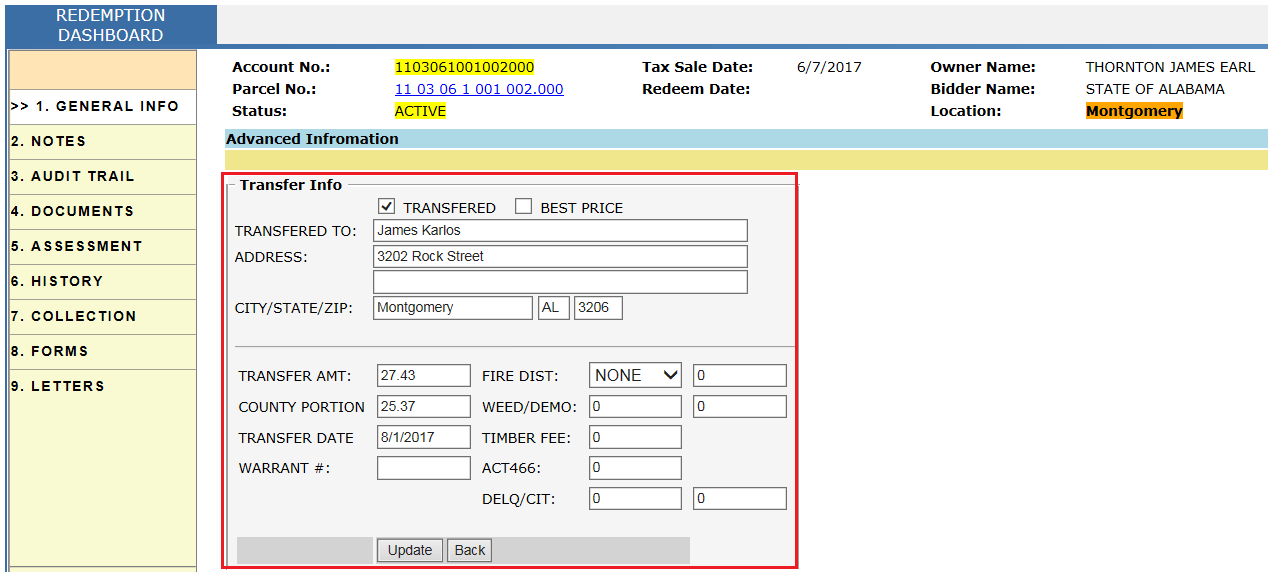
Note: In some cases, County can sell the property at Best Price when the County is not getting any taxes many years. Users can do this by marking the Best Price checkbox.
• From the Redemption Dashboard, update the Paid By info and click the Transfer button to transfer the property. After clicking Transfer, it will redirect to the Collection Dashboard.
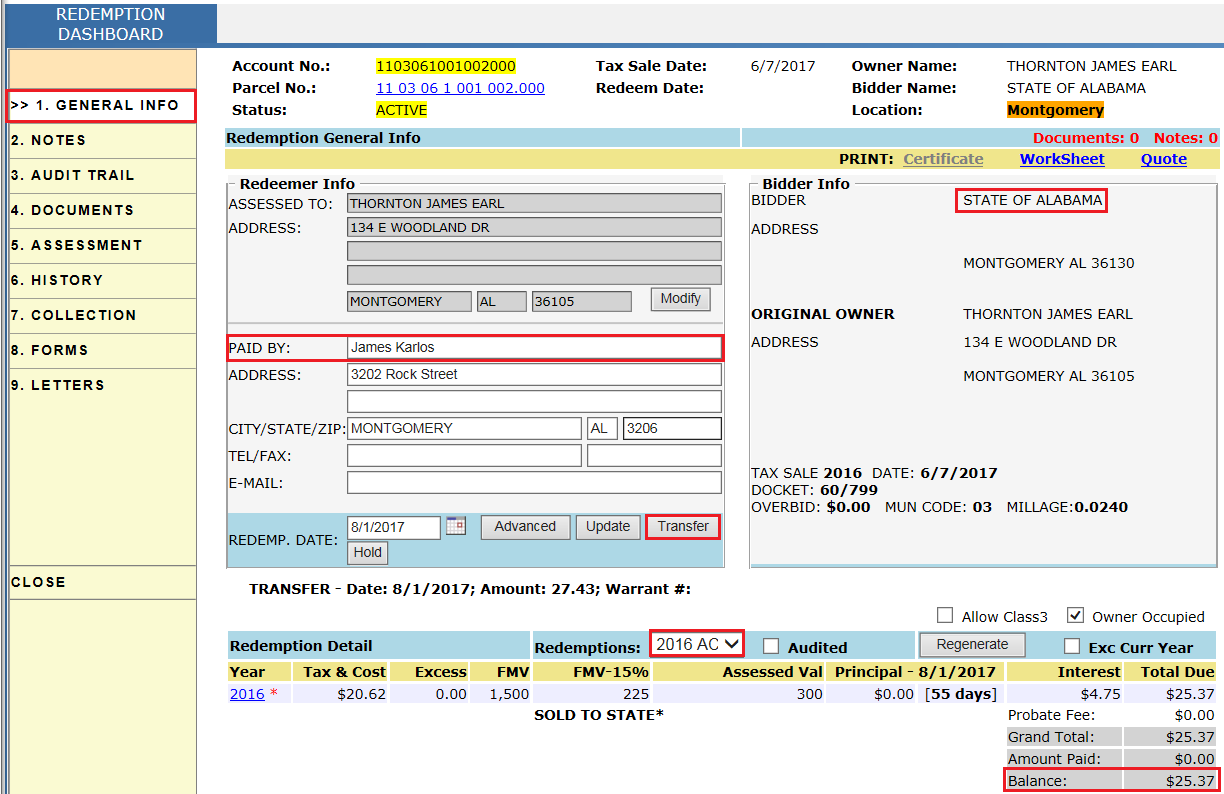
• From the Collection Dashboard, users can pay the Total Due in order to transfer the property (for reference see Case 1 - Sold To Individual).
• After paying the Total Due, users will see status is changed to Transferred.
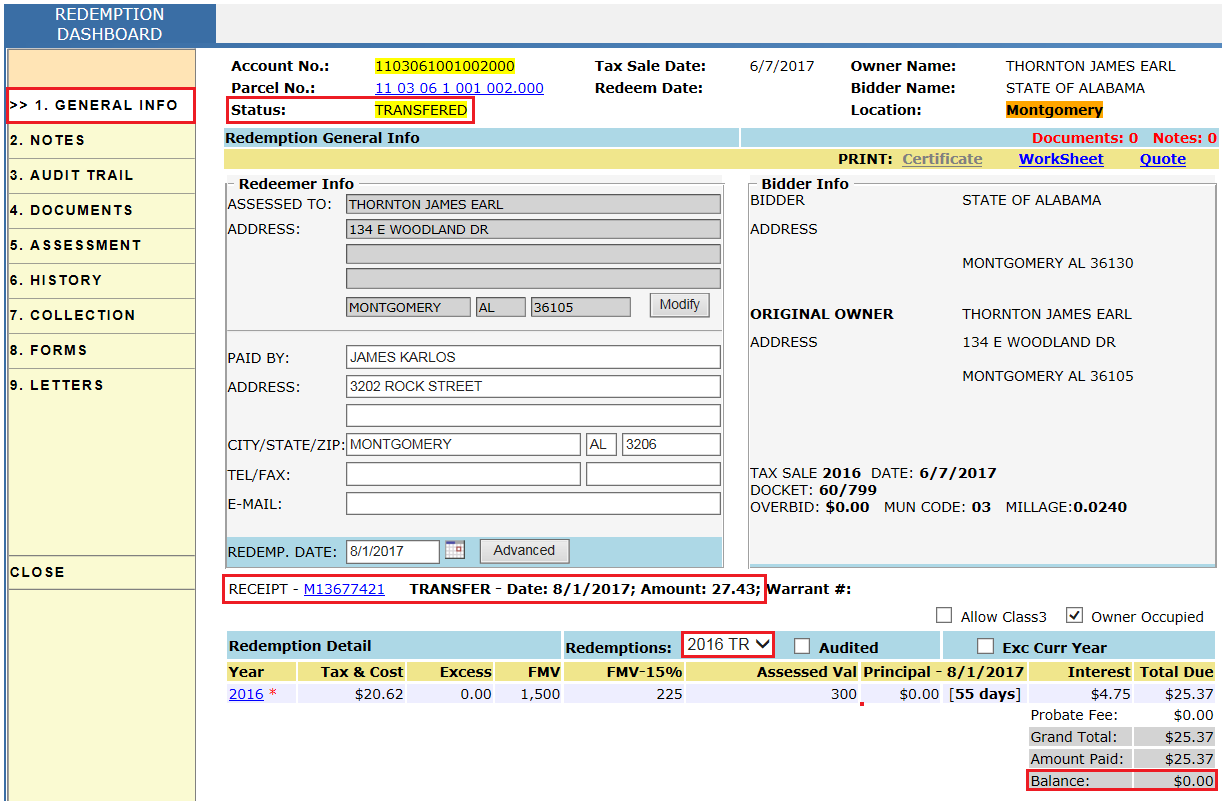
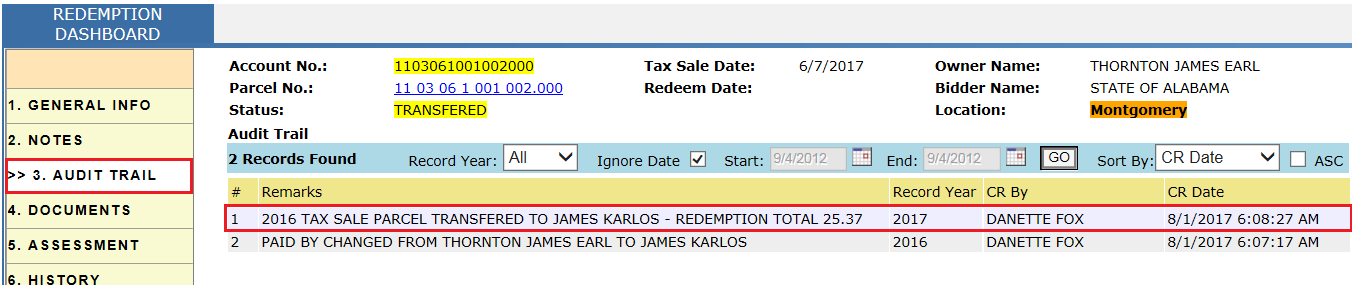
Audit Trail of Redemption Dashboard: Once the parcel is Transferred, users can see to whom the property is transferred and total paid.
Flags generated for the parcel: After Transferring, a flag is generated to the parcel in which privileged users must process by creating a supplement receipt on the name of investor.

Redemption Of Property Transferred To Individual/Investor
If a parcel is sold to state and then transferred to investor then the original owner can redeem the property if the tax deed is not yet issued to the investor.
Case Setup: Parcel is sold in 2016 tax sale to State on 06/07/2017. After that, property is transferred to investor (JAMES KARLOS) on 08/01/2017. Now, Owner (THORNTORN JAMES EARL) came to redeem the property on 08/01/2017.
• Click the Redeem button to redeem the property which will redirect to the Collection Dashboard.
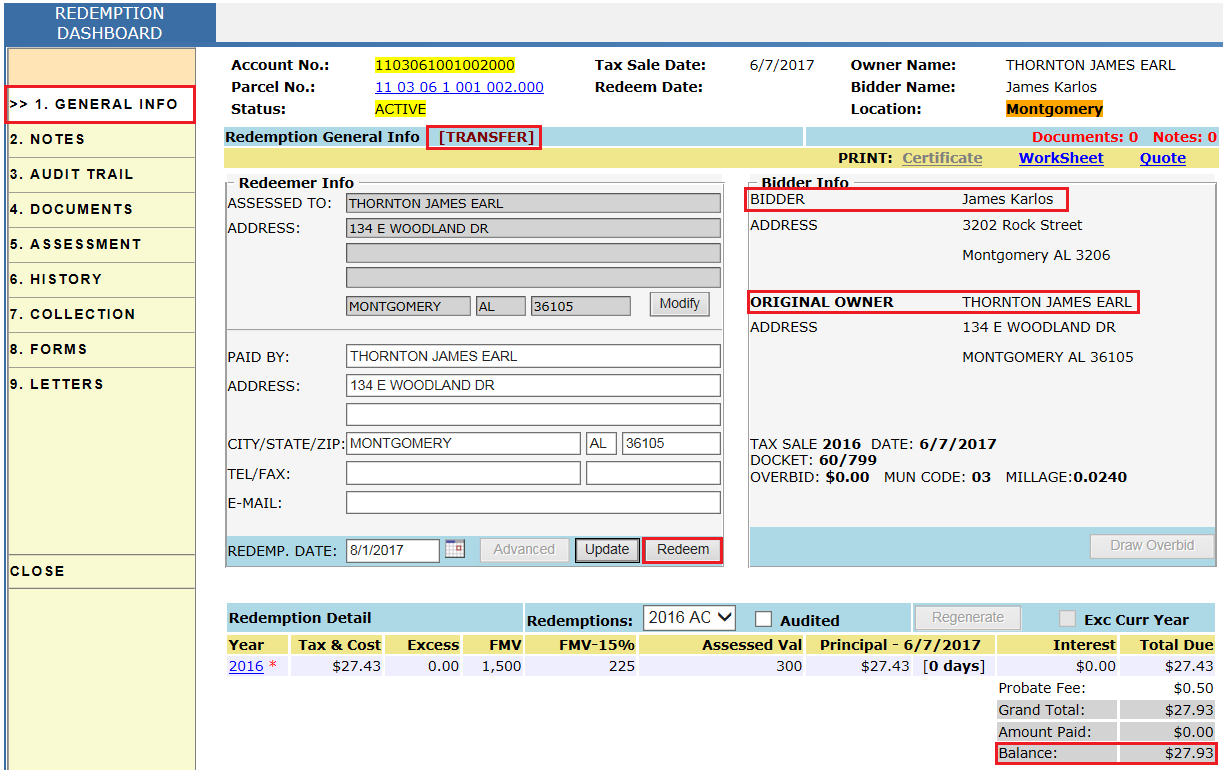
• From the Collection Dashboard, users can pay the Total Due to redeem property (for reference see Case 1 - Sold To Individual).
• After paying the Total Due, status is changed to Redeemed and the Certificate of Land Redemption is generated.
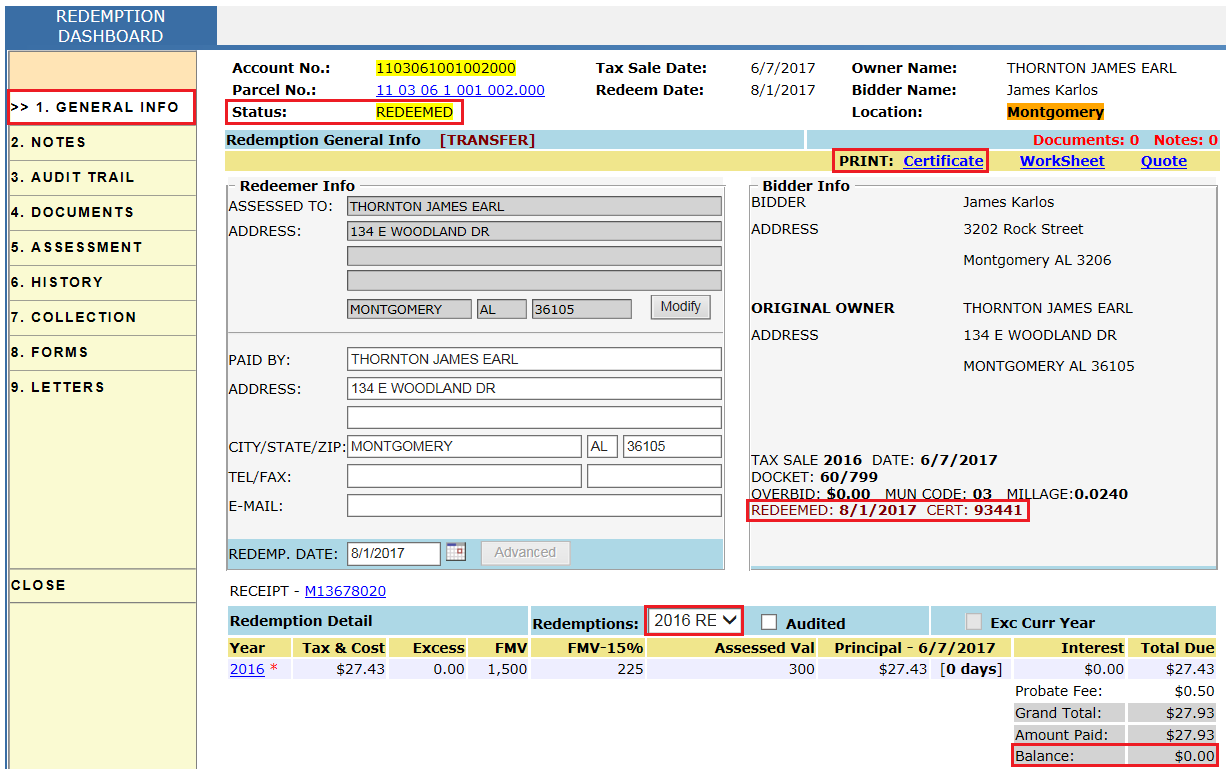
• Users can print the Certificate of Land Redemption by clicking the Certificate hyperlink (for reference see Case 1 - Sold To Individual).
Audit Trail of Redemption Dashboard: Once the parcel is redeemed, users can see who redeemed the property, total paid, and the assignment of redemption certificate along with a certificate number.
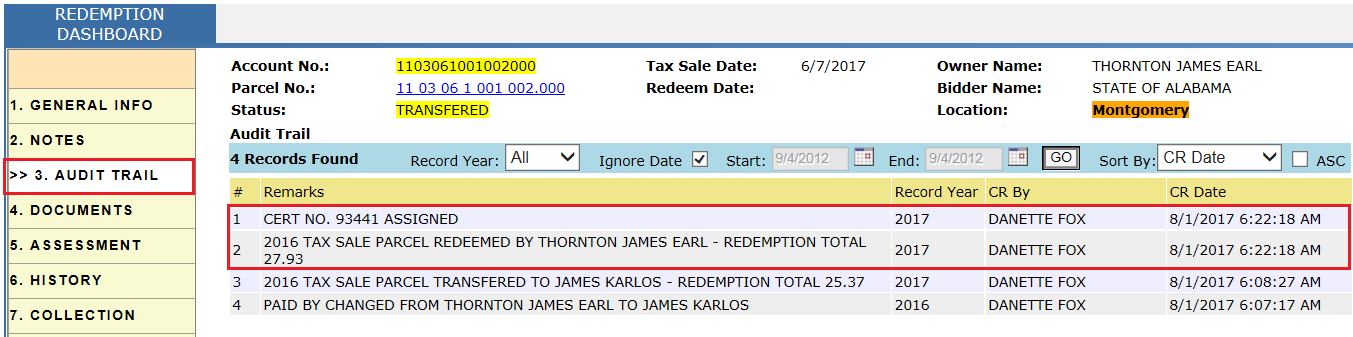
Flags generated for the parcel: After Redeeming, flags will be generated on the parcel and privileged users must process this flag by creating a supplement receipt on the name of Redeemer.

Tax Deed
If a parcel is sold/transferred to an investor and the owner hasn’t come to redeem property before three years from the date of tax sale then the investor is eligible to get a tax deed (a legal document that grants ownership of a property).
Case Setup: Parcel is sold in 2013 tax sale to individual/investor (MERCURY FUNDING LLC) on 06/04/2014. Owner never redeemed the property within the three year window. The active redemption record became stale and the individual came to get the tax deed.
• From the Tax Sale page, click the Redeem hyperlink which will redirect to the Redemption Dashboard.

• Click the Regenerate button.
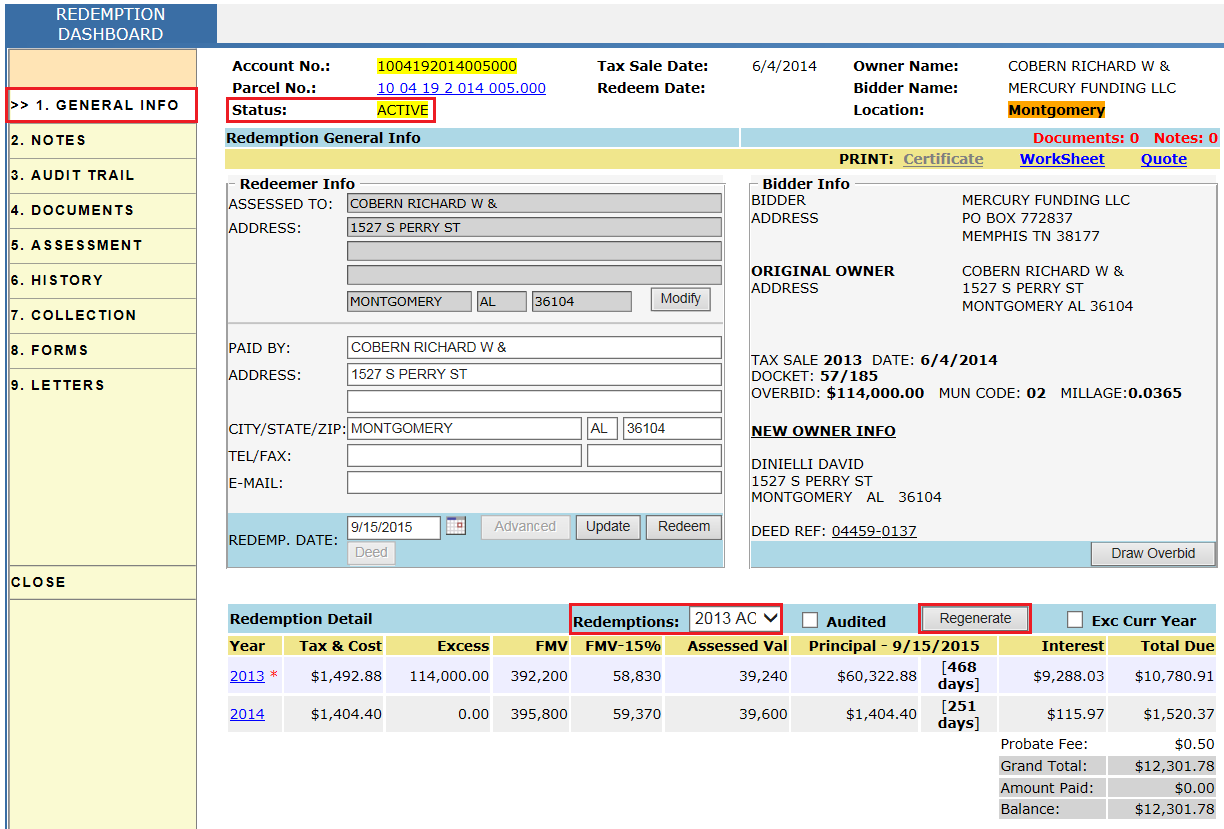
• After clicking the Regenerate button the redemption record becomes stale as the owner hasn’t come to redeem the property within three years. Click the Deed button to pay the fee for the tax deed, if any (Some counties may charge $5 for tax deed, but in this case it is $0).
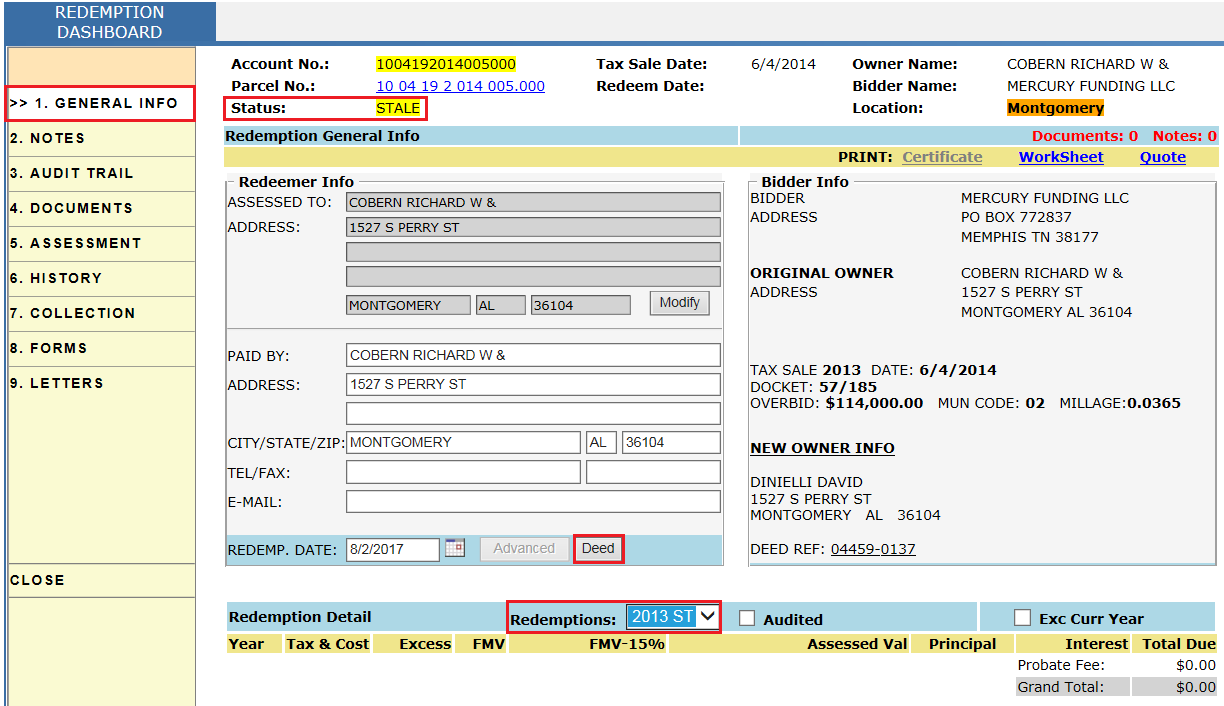
• After clicking on Deed, a receipt will be generated. In this case, there is need to pay the receipt as amount is $0.
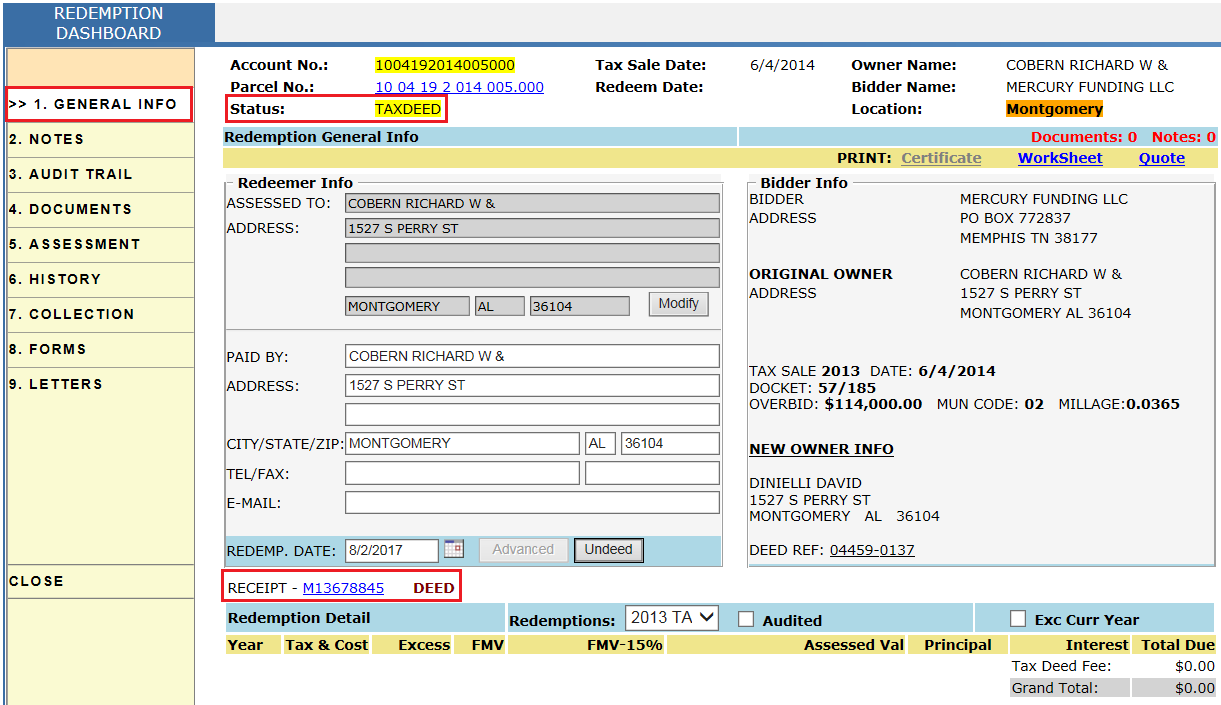
Audit Trail of Redemption Dashboard:

Reports Used
1) Under this report, users can see all the parcels which are available to redeem, already redeemed, transferred etc.
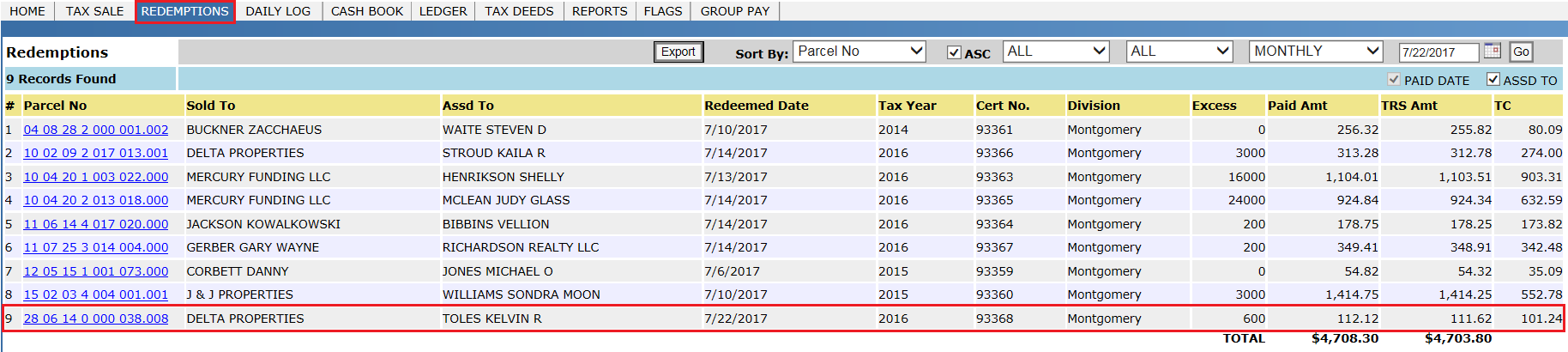
2) Under this report, users can see all redeemed parcels.
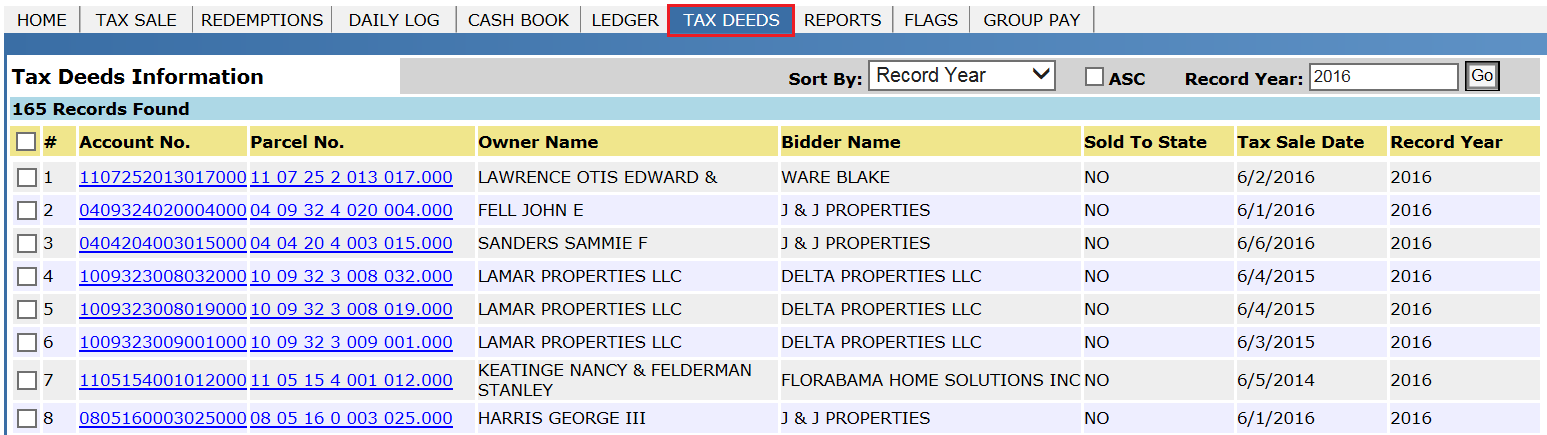
3) Under this report, users can see tax sale deeds information.
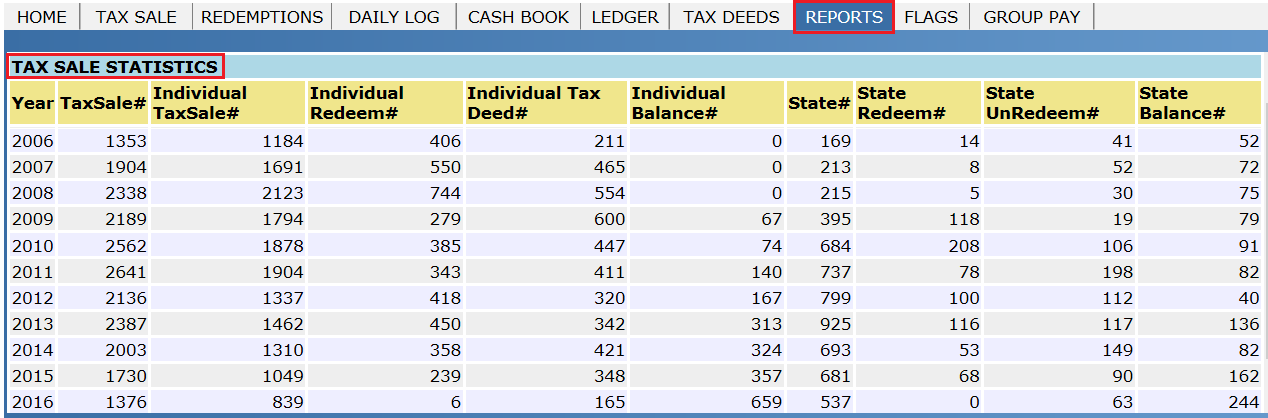
4) Under this report, users can see detail count of number of parcels which are sold to individual, state, or redeemed etc.
Letters To Be Printed
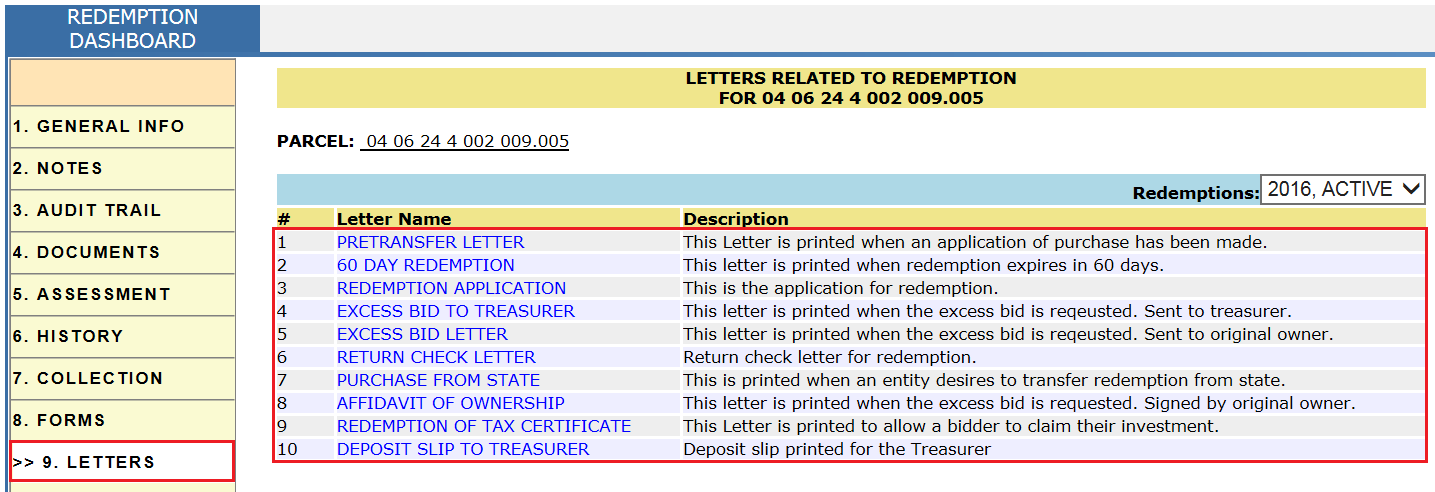
There are different letters which must be printed throughout the workflow. User can print those letters from the LETTERS tab of Redemption Dash Board.

Confidential | Copyright © 2017 E-Ring, Inc.